CMake
Så langt har du kjørt programmer gjennom CLions grønne play-knapp. Bak den knappen sitter CMake.
CMake er ikke en kompilator, og det er heller ikke det som faktisk bygger programmet ditt. Det er en byggesystem-generator: du beskriver prosjektet ditt for CMake i en liten fil kalt CMakeLists.txt, og CMake genererer de plattformspesifikke instruksjonene (Makefiler på Linux, Visual Studio-prosjektfiler på Windows, Ninja-byggefiler, Xcode-prosjekter på macOS) som et byggeverktøy — Ninja, Make eller MSBuild — deretter følger for å kalle kompilatoren. Å trykke play kjører CMake først og så det byggeverktøyet, etter hverandre. CLions standard byggeverktøy er Ninja. Skriv prosjektbeskrivelsen én gang; bygg den hvor som helst.
CMake gjør bygget portabelt, ikke programmet det produserer: den kjørbare filen bygges fortsatt for ett operativsystem og én CPU, og den samme kildekoden er ikke garantert å kompilere på hver kompilator. Portabilitet dekker hva som bærer over plattformgrensene og hva som ikke gjør det.
Under den ene knappen passerer koden din gjennom flere trinn, og CMakes jobb er å drive dem i rekkefølge:
graph LR
    SRC["Koden din (.cpp / .hpp)"] --> PRE[Preprosessor]
    PRE --> COMP[Kompilator]
    COMP --> OBJ["Objektfiler (.o)"]
    OBJ --> LINK[Linker]
    LINK --> EXE["Kjørbar fil"]

    COMP -.->|"syntaks- / typefeil"| CE([kompilatorfeil])
    LINK -.->|"undefined reference / multiple definition"| LE([linkerfeil])
Trinnene forteller deg også hvor en feil kom fra: kompilatoren klager på én fils syntaks eller typer, mens linkeren klager først når den prøver å sy objektfilene sammen — se Lese kompilatorfeil.
CMake er det mest brukte byggesystemet for C++ — de fleste kryssplattformprosjekter og biblioteker du møter, kommer til å bruke det. Dette kapittelet lærer deg minimumet du trenger i dag, og viser deretter hvordan det vokser i takt med prosjektet ditt.
Det minste CMake-prosjektet
Et program på én fil trenger tre linjer:
Det er alt. Lagre som CMakeLists.txt ved siden av main.cpp, og CLion (eller cmake -B build && cmake --build build på kommandolinjen) kompilerer main.cpp til en kjørbar fil kalt hello.
Hva hver linje gjør:
| Linje | Betydning |
|---|---|
cmake_minimum_required(VERSION 3.16) |
Den eldste CMake-versjonen som kan bygge dette prosjektet. 3.16 er et fornuftig gulv for moderne C++. |
project(hello) |
Gir prosjektet navn. Må komme før alle targets. |
add_executable(hello main.cpp) |
Definer et kjørbart target kalt hello, bygd fra main.cpp. |
Du kommer til å kopiere denne malen inn i mange prosjekter. Bli kjent med den.
CMake i CLion
CLion er bygd rundt CMake: CMakeLists.txt er prosjektet. Det har en håndfull praktiske konsekvenser, og å kjenne dem på forhånd sparer deg for mye hodebry.
Å åpne et prosjekt betyr å åpne mappen. Bruk File → Open og velg mappen som inneholder CMakeLists.txt (å velge selve filen fungerer også). Dette betyr mest når du kloner et repo fra GitHub: åpne den klonede mappen, så finner CLion CMakeLists.txt, konfigurerer prosjektet, og den grønne ▶-knappen virker. Åpner du i stedet en enslig .cpp-fil, får du en editor uten noe prosjekt bak — ingenting å bygge, ingenting å kjøre.
Å redigere CMakeLists.txt krever en ny innlasting. CMake leser filen når den konfigurerer prosjektet, ikke kontinuerlig. Når du redigerer CMakeLists.txt, dukker det opp et banner øverst i editoren som tilbyr å laste prosjektet inn på nytt — klikk det, eller klikk Enable auto-reload én gang, så kjører CLion CMake på nytt av seg selv et øyeblikk etter hver endring. Før prosjektet er lastet inn på nytt, har endringen din ingen effekt. Dette er den aller vanligste "jeg la til filen, men den bygges fortsatt ikke."
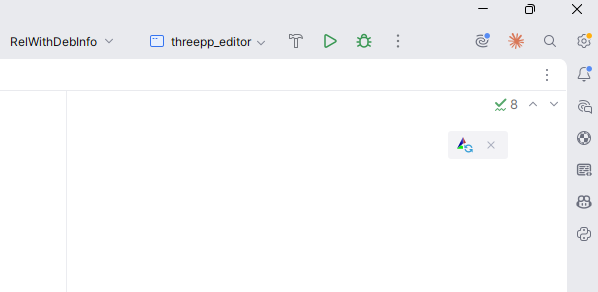
Nye filer må stå oppført i et target. Når du oppretter en fil med File → New → C/C++ Source File, viser CLion en avkrysningsboks Add to targets — la den stå avkrysset, så skriver CLion filen inn i add_executable-linjen din for deg. En fil som kommer inn på annen måte (kopiert inn fra filutforskeren, lastet ned) plukkes ikke opp automatisk: legg den til i listen i CMakeLists.txt selv, og last inn på nytt.
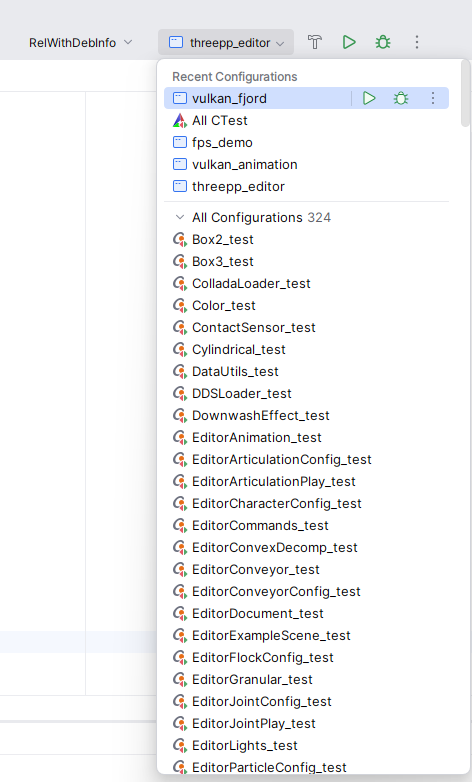
Ett target, én oppføring i ▶-rullegardinmenyen. Hver add_executable i prosjektet ditt blir en oppføring i rullegardinmenyen ved siden av den grønne play-knappen, og ▶ bygger og kjører det valgte. Når et prosjekt har flere programmer — en app og testene dens, for eksempel — sjekk den menyen før du konkluderer med at programmet ditt "ikke kjørte".
Feil dukker opp to forskjellige steder. Feil i selve CMakeLists.txt er feil ved konfigurering (configure-time): de vises i CMake-verktøyvinduet nederst i CLion, i det øyeblikket prosjektet lastes (på nytt). Kompilator- og linkerfeil vises i Build-vinduet når du faktisk bygger. Trinndiagrammet ovenfor forteller deg hvem som klager; vinduet det vises i forteller deg når det gikk galt.
Byggemappen kan trygt kastes. Alt CMake og kompilatoren genererer havner i cmake-build-debug/ (CLions standardnavn på build/-mappen). Hvis CMake noen gang havner i en forvirret tilstand — etter omdøpinger, flytting av prosjektet eller bytte av verktøykjede — bruk Tools → CMake → Reset Cache and Reload Project, eller bare slett cmake-build-debug/-mappen. Ingenting i den er ditt; neste bygg regenererer alt sammen.
Sette C++-standarden
Hvilken standard som brukes hvis du ikke sier noe, avhenger av kompilatoren, og det er sjelden den du vil ha. Sett den eksplisitt:
cmake_minimum_required(VERSION 3.16)
project(hello)

set(CMAKE_CXX_STANDARD 20)
set(CMAKE_CXX_STANDARD_REQUIRED ON)

add_executable(hello main.cpp)
CMAKE_CXX_STANDARD 20 ber kompilatoren bruke C++20 (standarden dette emnet underviser i). CMAKE_CXX_STANDARD_REQUIRED ON gjør det til et hardt krav; uten den ville en eldre kompilator i stillhet falt tilbake til det den støtter.
Slå på kompilator-advarsler
Flere sider i denne boken ber deg "slå på advarsler". En advarsel er kompilatoren som flagger kode som er lovlig, men sannsynligvis en feil — if (x = 5) i stedet for ==, en variabel du deklarerte og aldri brukte, en funksjon som glemmer å return-e. De er noe av den mest verdifulle tilbakemeldingen kompilatoren gir deg, og de fleste av dem er av som standard.
Du slår dem på med target_compile_options — men her er haken dette kapittelet har hintet om: flaggnavnene er forskjellige mellom kompilatorer. GCC og Clang staver dem på én måte, Microsofts MSVC på en annen:
| Kompilator | Slå på advarsler | Behandle advarsler som feil |
|---|---|---|
| GCC, Clang (inkl. CLions MinGW) | -Wall -Wextra |
-Werror |
| MSVC (Visual Studio) | /W4 |
/WX |
Hardkod -Wall -Wextra, og CMakeLists.txt ryker i det øyeblikket noen bygger den med MSVC — nøyaktig den ikke-portabiliteten vi vil unngå. Løsningen er å spørre CMake hvilken kompilator den bruker, og velge de riktige flaggene. CMake setter variabelen MSVC til sann for Visual Studio, så en if() gjør jobben:
add_executable(hello main.cpp)

if(MSVC)
    target_compile_options(hello PRIVATE /W4)
else()
    target_compile_options(hello PRIVATE -Wall -Wextra)
endif()
Nå slås advarsler på enten prosjektet bygges med GCC, Clang eller MSVC. De vises i CLions Build-vindu hver gang du kompilerer — les dem.
Når koden din først bygger uten advarsler, kan du gjøre advarsler fatale, slik at en advarsel stopper bygget i stedet for å rulle forbi. Det flagget er også forskjellig (-Werror vs. /WX), så det går i de samme grenene:
if(MSVC)
    target_compile_options(hello PRIVATE /W4 /WX)
else()
    target_compile_options(hello PRIVATE -Wall -Wextra -Werror)
endif()
Å gjøre advarsler fatale er strengere enn du trenger den første dagen, men det er en vane verdt å vokse inn i: den garanterer at du aldri overser en advarsel ved et uhell.
Behandle kompilatorer og plattformer forskjellig
Advarselsblokken ovenfor er ett tilfelle av et generelt behov: CMake beskriver bygget én gang, men hva som er riktig å gjøre, avhenger noen ganger av hvilken kompilator eller hvilket operativsystem som bygger. Vanlige if()-blokker og noen få innebygde variabler dekker dette.
For å forgrene på kompilatoren:
| Sjekk | Sann når |
|---|---|
if(MSVC) |
kompilatoren er Microsofts MSVC |
if(CMAKE_CXX_COMPILER_ID STREQUAL "GNU") |
kompilatoren er GCC |
if(CMAKE_CXX_COMPILER_ID STREQUAL "Clang") |
kompilatoren er Clang (Apples utgave rapporterer "AppleClang") |
For å forgrene på operativsystemet:
| Sjekk | Sann på |
|---|---|
if(WIN32) |
Windows (også 64-bit) |
if(APPLE) |
macOS |
if(UNIX) |
Linux og macOS |
APPLE er også UNIX, så test APPLE først når du trenger å skille dem:
if(WIN32)
    target_compile_definitions(app PRIVATE PLATFORM_WINDOWS)
elseif(APPLE)
    target_compile_definitions(app PRIVATE PLATFORM_MAC)
elseif(UNIX)
    target_compile_definitions(app PRIVATE PLATFORM_LINUX)
endif()
target_compile_definitions definerer en preprosessor-makro — CMake-ekvivalenten til å skrive #define PLATFORM_WINDOWS øverst i hver fil — slik at C++-koden din kan velge en OS-spesifikk gren med #ifdef PLATFORM_WINDOWS.
To regler holder dette under kontroll:
- Bruk det bare når du må. Vanlig standard C++ kompilerer allerede overalt; grip til en betingelse bare for de genuint plattformspesifikke delene — et kompilatorflagg, et systembibliotek, et API som bare finnes på ett OS. De fleste prosjekter i dette emnet trenger ingen utover advarselsflaggene ovenfor.
- Test på hver plattform du forgrener for. En
WIN32-blokk som aldri har blitt kompilert på Windows, er en gjetning, ikke en funksjon — se Portabilitet.
Flere kildefiler
Et ekte prosjekt vokser raskt forbi én fil. Anta at du har:
Bare list opp de ekstra .cpp-filene i add_executable:
Header-filer (.hpp / .h) listes ikke opp; de trekkes inn av #include-linjer i kildefilene. CMake trenger bare å vite hvilke .cpp-filer som skal kompileres.
For større prosjekter kan du bruke glob, men glob-baserte kildelister plukker ikke opp nye filer før CMake kjører på nytt. Eksplisitte lister er klarere:
Inni en header
Hva er egentlig i motor.hpp? Husk deklarasjoner vs. definisjoner fra kapittel 1: deklarasjonen forteller kompilatoren at en funksjon finnes; definisjonen leverer kroppen dens. En header er en fil som samler deklarasjoner flere kildefiler trenger å dele, og #include "motor.hpp" limer den inn i hvilken som helst fil som ber om det:
// motor.cpp — definisjonene: hvordan det virker
#include "motor.hpp"

double motorRpm(int throttlePercent) {
    return throttlePercent * 42.0;
}
// main.cpp — enhver fil som inkluderer headeren kan kalle funksjonen
#include <iostream>
#include "motor.hpp"

int main() {
    std::cout << motorRpm(50) << "\n";
}
Både motor.cpp og main.cpp kompileres (det er add_executable-listen); headeren limes inn i hver av dem. To konvensjoner i den lille headeren fortjener en ordentlig introduksjon, for hver header du noensinne skriver, bruker begge.
#pragma once — include-guarden. #include er en bokstavelig innliming, og i et ekte prosjekt ender én fil lett opp med å inkludere den samme headeren to ganger — én gang direkte, og én gang til gjennom en annen header som også inkluderer den. Kompilatoren ville da sett hver deklarasjon i den to ganger og avvist filen med en redefinition-feil. #pragma once på første linje forteller kompilatoren: "uansett hvor mange ganger denne filen etterspørres, lim den inn maksimalt én gang." Sett den øverst i hver header du skriver. Du kommer også til å møte den eldre stavemåten av den samme ideen i andres kode — særlig i Arduino-biblioteker og eldre veiledninger:
Det er en include-guard bygd av preprosessor-betingelser: den første innlimingen definerer makroen MOTOR_HPP, og #ifndef ("if not defined" — hvis ikke definert) får hver senere innliming til å hoppe rett til #endif. Den gjør nøyaktig samme jobb som #pragma once, til prisen av tre linjer og et makronavn du må holde unikt. #pragma once er teknisk sett ikke en del av C++-standarden, men hver kompilator du kommer til å møte, støtter den — skriv den i dine egne headere, og bare gjenkjenn #ifndef-formen når du ser den.
.h eller .hpp? Begge er header-filer, og kompilatoren behandler dem identisk — endelsen er ren konvensjon. .h er arvet fra C, så det er det C-biblioteker (og Arduino-verdenen) bruker; .hpp signaliserer "her er det C++ inni". Denne boken bruker .hpp for sine egne headere, slik at en leser kan se med ett blikk hvilke headere som er C++. Vær obs i CLion: File → New → C/C++ Header File foreslår .h som standard — navngi filen med .hpp selv (du kan endre standarden under Settings → Editor → Code Style → C/C++, på fanen New File Extensions).
Headere i en egen mappe
En konvensjon som lønner seg etter hvert som prosjekter vokser:
hello/
├── CMakeLists.txt
├── include/
│   ├── motor.hpp
│   └── sensor.hpp
└── src/
    ├── main.cpp
    ├── motor.cpp
    └── sensor.cpp
Fortell CMake hvor headerne bor, slik at #include "motor.hpp" virker fra innsiden av enhver kildefil:
add_executable(hello src/main.cpp src/motor.cpp src/sensor.cpp)
target_include_directories(hello PRIVATE include)
target_include_directories(<target> PRIVATE <path>) legger <path> til i listen over mapper kompilatoren søker i etter #include-ede filer når <target> bygges.
PRIVATE betyr "dette brukes bare til å bygge dette targetet." For kjørbare filer er det alltid det du vil ha. (Du kommer til å se PUBLIC og INTERFACE når du begynner å skrive biblioteker som annen kode linker mot.)
Bygge biblioteker
Når du har flere kjørbare filer som deler kode (testene dine, hovedprogrammet ditt, kanskje et kjapt kommandolinjeverktøy), legg den delte koden i et bibliotek slik at den kompileres én gang:
add_library(motor src/motor.cpp src/sensor.cpp)
target_include_directories(motor PUBLIC include)

add_executable(hello src/main.cpp)
target_link_libraries(hello PRIVATE motor)
Ett bibliotek, kompilert én gang, delt av hver kjørbare fil som linker det:
%%{init: {'flowchart': {'curve': 'linear'}}}%%
graph TD
    APP["hello (kjørbar fil)"] -->|linker| LIB["motor (bibliotek)"]
    TESTS["tests (kjørbar fil)"] -->|linker| LIB
Hva som endret seg:
add_librarydefinerer et bibliotek-target. Som standard er det et statisk bibliotek — den kompilerte koden dets bakes inn i alt som linker det (mer om statisk vs. delt rett nedenfor).target_link_libraries(hello PRIVATE motor)forteller CMake at den kjørbare filenhellobruker biblioteketmotor. Kompilatoren ser nåmotorsine headere, og linkeren kombinerer nåmotorsin kompilerte kode inn ihello.- Biblioteket bruker
PUBLICfor include-mappen sin, som betyr at alle som linker motmotor, også fårmotorsininclude/-mappe på søkestien sin. Det er det du vil ha for et biblioteks offentlige headere.
Statiske vs. delte biblioteker
add_library bygger et statisk bibliotek som standard, og for dine prosjekter er det riktig valg. Forskjellen er når bibliotekets kompilerte kode blir en del av programmet ditt:
- Et statisk bibliotek (
.a, eller.libpå Windows) kopieres inn i hver kjørbare fil som linker det, ved byggetid. Du får ett selvstendig program — ingenting ekstra å levere med, og ingenting som kan mangle når det kjører. Prisen er en større kjørbar fil, og du må linke på nytt for å få med en endring i biblioteket. - Et delt (eller dynamisk) bibliotek —
.dllpå Windows,.sopå Linux,.dylibpå macOS — forblir en egen fil. Den kjørbare filen noterer bare at den trenger det, og systemet laster det når programmet starter. Kjørbare filer holder seg små, flere programmer kan dele én kopi, og du kan bytte inn en ny versjon av biblioteket uten å bygge dem på nytt.
Du velger med et nøkkelord:
add_library(motor STATIC src/motor.cpp)   # bakes inn i den kjørbare filen (standard)
add_library(motor SHARED src/motor.cpp)   # en egen .dll / .so / .dylib
Haken med delte biblioteker er den som biter nybegynnere: programmet må finne den bibliotekfilen ved kjøring. På Windows må den ligge ved siden av .exe-filen, eller i en mappe på din PATH; Linux og macOS har sine egne søkestier for biblioteker. Hvis systemet ikke finner den, nekter programmet å starte — "DLL not found" på Windows, "error while loading shared libraries" på Linux — selv om det kompilerte og linket perfekt. Et statisk bygg har ingenting å lokalisere ved kjøring, så det feiler aldri på denne måten.
Foretrekk statisk for emneprosjekter: én fil, ingenting å miste, ingenting å lokalisere. Delte biblioteker gjør nytte for seg i større systemer — når mange programmer deler ett stort bibliotek, eller når et bibliotek må kunne oppdateres for seg selv — og når en tredjeparts avhengighet bare leveres som en .dll/.so, og da må du legge den der programmet ditt finner den.
CMake har også en global bryter,
BUILD_SHARED_LIBS. Slå denON, og hveradd_librarysom ikke sierSTATICellerSHAREDeksplisitt, bygger delt; la den være i fred, og du får statisk — den fornuftige standarden her.
Bruke tredjepartsbiblioteker
Før eller senere vil du ha et bibliotek noen andre har skrevet — et testrammeverk, et formateringsbibliotek, et mattebibliotek. Den enkleste måten å trekke ett inn i et CMake-prosjekt på er FetchContent: du navngir et git-repository og en versjon, og CMake laster ned og bygger det som en del av ditt eget bygg. Her er hele mønsteret, som henter Catch2 (testrammeverket testkapittelet bruker):
include(FetchContent)

FetchContent_Declare(
    Catch2
    GIT_REPOSITORY https://github.com/catchorg/Catch2.git
    GIT_TAG        v3.5.2                      # lås en versjon, aldri en bevegelig branch
)
FetchContent_MakeAvailable(Catch2)

add_executable(tests test_motor.cpp)
target_link_libraries(tests PRIVATE Catch2::Catch2WithMain)
Fire steg: include(FetchContent) laster funksjonaliteten; FetchContent_Declare sier hvor avhengigheten bor og hvilken versjon; FetchContent_MakeAvailable laster ned og bygger den; deretter kjører du target_link_libraries mot et target avhengigheten eksporterer.
Hva Catch2::Catch2WithMain betyr. Det namespace::target-navnet er et target det hentede prosjektet eksporterer for at du skal linke det. Å linke det gjør alt på én gang: kompilatoren får Catch2 sine include-stier (slik at #include <catch2/catch_test_macros.hpp> løses opp), og linkeren får den kompilerte koden dets. Du jakter aldri på header-mapper eller .lib-filer for hånd — den ene target_link_libraries-linjen tar med seg hele pakken. (:: er bare en navnekonvensjon som markerer det som et importert target, ikke et av dine egne.)
Det første bygget er tregt. Første gang du konfigurerer et prosjekt med en ny FetchContent-avhengighet, kloner CMake repositoryet og kompilerer det — det krever internettforbindelse og kan ta et minutt eller to. Etter det er det mellomlagret i build/-mappen din, og konfigureringen går raskt igjen.
Alternativer, bare nevnt ved navn. To andre tilnærminger finnes: find_package, som lokaliserer et bibliotek som allerede er installert på maskinen (vanlig på Linux, der systemets pakkebehandler leverer det), og dedikerte C++-pakkebehandlere som vcpkg og Conan. De betyr noe i større prosjekter og teamprosjekter; dette emnet trenger bare FetchContent.
To feillukter. Å vite når en feil dukker opp, forteller deg hva som gikk galt:
- En feil ved konfigurering (når CMake kjører, før noe kompileres) — vanligvis en skrivefeil i
FetchContent_Declare, feil repository-URL eller -tag, eller ikke noe nettverk å laste ned fra. undefined referenceved linking (koden kompilerte, men linkeren finner ikke bibliotekets funksjoner) — du hentet avhengigheten, men glemtetarget_link_libraries-linjen, så ingenting ble faktisk linket.
Bygge fra kommandolinjen
CLion kjører CMake for deg, men hvert CMake-prosjekt kan også bygges direkte:
# Konfigurer: generer byggefiler i en 'build/'-mappe
cmake -B build

# Bygg alt
cmake --build build

# Kjør den kjørbare filen (stien varierer litt mellom plattformer)
./build/hello              # Linux / macOS
./build/hello.exe          # Windows, CLions medfølgende MinGW (single-config)
./build/Debug/hello.exe    # Windows med MSVC (multi-config)
-B build-flagget legger alle genererte filer i build/ slik at de holder seg unna kildetreet ditt. Legg build/ i .gitignore — en naken build/-linje matcher en mappe med det navnet på et hvilket som helst nivå, så den dekker nestede prosjekter også.
Byggekonfigurasjoner: Debug og Release
En byggekonfigurasjon styrer hvordan koden din kompileres — først og fremst om optimalisereren kjører og om feilsøkingsinformasjonen beholdes. To er standard:
| Debug | Release | |
|---|---|---|
| Optimalisering | ingen (-O0) — rask å bygge, lett å steppe gjennom |
full (-O2/-O3) — rask å kjøre |
| Feilsøkingsinfo | full (-g) — debuggeren ser hver variabel |
strippet ned |
assert |
aktiv | fjernet (NDEBUG er definert — se Feilhåndtering) |
| Grip til den når | du utvikler og feilsøker | du måler hastighet, leverer fra deg |
Velg én når du konfigurerer prosjektet:
Med en multi-config-generator (Visual Studio) har
-DCMAKE_BUILD_TYPEingen effekt — én byggemappe rommer hver konfigurasjon, og du velger én ved byggetid i stedet:cmake --build build --config Debug. Single-config-generatorer (Ninja, Make) bruker-DCMAKE_BUILD_TYPEsom vist.
I CLion skriver du ikke dette — verktøylinjen har en konfigurasjonsvelger, og den holder en egen mappe per konfigurasjon (cmake-build-debug/, cmake-build-release/) slik at det å bytte mellom dem ikke bygger alt på nytt. Utvikle i Debug; bytt til Release for å måle ytelse eller gi programmet til noen andre.
Et program kan passere i Debug og feile i Release (eller omvendt). Den vanlige synderen er en
assertsom fanget problemet i Debug, men er kompilert bort i Release, eller optimalisereren som avdekker en latent feil som tilfeldigvis "virket" uoptimalisert. Det er en ekte feil i koden din, ikke en kompilatorfeil — jakt den ned i stedet for å trekke deg tilbake til konfigurasjonen som skjulte den.
CMake-opsjoner: gjøre deler av bygget valgfrie
Noen ganger bør en del av bygget være valgfri. Det vanlige tilfellet er testene: en som bare vil kjøre programmet ditt, bør ikke tvinges til å laste ned et testrammeverk. option() deklarerer en bryter brukeren kan slå på eller av:
option(BUILD_TESTS "Build the unit tests" ON)

# biblioteket og programmet bygges alltid
add_library(motor src/motor.cpp)
add_executable(app src/main.cpp)
target_link_libraries(app PRIVATE motor)

if(BUILD_TESTS)
    # konfigureres bare når BUILD_TESTS er ON
    add_executable(tests tests/test_motor.cpp)
    target_link_libraries(tests PRIVATE motor Catch2::Catch2WithMain)
endif()
Catch2::Catch2WithMain er ikke et av dine egne targets — det er et target fra en hentet avhengighet, testrammeverket Catch2. Se Bruke tredjepartsbiblioteker ovenfor for hvordan et slikt navn kommer inn i bygget ditt.
option(<NAME> "<description>" <default>) oppretter en boolsk verdi som har ON eller OFF som standard; alt inne i den tilhørende if(<NAME>) … endif() konfigureres bare når den er på. Standarden gjelder med mindre noen overstyrer den på kommandolinjen:
Slik er testkapittelets Catch2-oppsett ment å kobles: legg Catch2 sine FetchContent-linjer og test-targetet inne i if(BUILD_TESTS)-blokken, slik at rammeverket lastes ned og bygges bare når du faktisk vil kjøre tester.
Prefiks navnet for å unngå kollisjoner. En naken
BUILD_TESTSkan kollidere med en opsjon med samme navn hvis prosjektet ditt noen gang bygges inne i et større et. Konvensjonen er å prefikse den med prosjektnavnet ditt —option(MOTOR_SIM_BUILD_TESTS "Build the unit tests" ON)— slik at den forblir entydig.
En merknad om prosjektoppsett
Oppsettet nedenfor skalerer fra énfilsskript til systemer med flere biblioteker:
my_project/
├── CMakeLists.txt
├── README.md
├── .gitignore
├── include/        # offentlige headere
├── src/            # implementasjonsfiler
└── tests/          # tester (se kapittel 6)
Du trenger ikke alle disse fra dag én. Start med én main.cpp og én CMakeLists.txt. Del opp i src/ og include/ når du har mer enn fire–fem filer. Legg til tests/ når du begynner å skrive tester. Poenget er å vokse inn i strukturen, ikke å sette opp alt før du skriver noe kode.
For en mer forseggjort konvensjon brukt i større industriprosjekter, se Pitchfork-oppsettet.
Dele opp bygget over flere mapper
Etter hvert som et prosjekt vokser, blir én stor CMakeLists.txt på toppen vanskelig å lese. Løsningen er å gi hver mappe sin egen CMakeLists.txt og la toppnivåfilen trekke dem inn med add_subdirectory:
# CMakeLists.txt på toppnivå
cmake_minimum_required(VERSION 3.16)
project(my_project)

set(CMAKE_CXX_STANDARD 20)
set(CMAKE_CXX_STANDARD_REQUIRED ON)

add_subdirectory(src)      # biblioteket
add_subdirectory(app)      # applikasjonen som bruker det
add_subdirectory(tests)    # testene
add_subdirectory(src) betyr "det finnes en annen CMakeLists.txt i src/ — gå og kjør den." Hver undermappe definerer så sine egne targets, med biblioteket og applikasjonen holdt i separate mapper:
# src/CMakeLists.txt
add_library(my_lib motor.cpp sensor.cpp)
target_include_directories(my_lib PUBLIC ${PROJECT_SOURCE_DIR}/include)
# tests/CMakeLists.txt
add_executable(tests test_motor.cpp)
target_link_libraries(tests PRIVATE my_lib)   # biblioteket definert borte i src/
To ting får dette til å virke:
- Targets er synlige på tvers av mapper.
my_libopprettes isrc/, menapp/ogtests/kan likevel linke det. Du trenger ikke definere et target før linjen som linker det: CMake løser opp target-navn når det genererer bygget på slutten av konfigureringen, så et navn itarget_link_librariesfinner targetet sitt uansett hvor det er definert. Å leggesrcforan mappene som bruker det, er likevel den riktige vanen — det holder filen lesbar og speiler rekkefølgen ting bygges i — men det er konvensjon, ikke et krav. ${PROJECT_SOURCE_DIR}er mappen til det nærmesteproject()-kallet, så${PROJECT_SOURCE_DIR}/includefinner de delte headerne fra enhver undermappe. (Foretrekk den fremfor${CMAKE_SOURCE_DIR}, som peker på det ytterste prosjektet og ryker hvis dette prosjektet noen gang trekkes inn i et større et medadd_subdirectory.)
Gevinsten: hver mappes bygg ligger ved siden av koden sin, og toppnivåfilen blir en kort innholdsfortegnelse. Det gjennomarbeidede eksempelet Tankstyringssystemet bruker nøyaktig dette oppsettet når det vokser til å få en testsuite.
Når bygget ryker
Fem feil står for nesten hvert eneste CMake-problem studenter kommer til laben med. Finn symptomet som passer, bruk løsningen.
Cannot find source file: motor.cpp — en feil ved konfigurering (CMake-verktøyvinduet, før noe kompileres). CMakeLists.txt navngir en fil som ikke er der den sier: en skrivefeil i navnet, eller filen bor i en undermappe (src/motor.cpp) mens listen sier motor.cpp. Stier i add_executable er relative til den CMakeLists.txt som inneholder dem — fiks stien, last inn på nytt.
undefined reference to 'motorRpm()' — en feil ved linking (Build-vinduet, etter at alt kompilerte). Linkeren fikk aldri den kompilerte kroppen til den funksjonen. Nesten alltid: du skrev motor.cpp, men glemte å liste den i add_executable, eller du glemte target_link_libraries-linjen for biblioteket som inneholder den. Legg den til, last inn på nytt, bygg på nytt. Merk villedningen: feilen rapporteres på filen som kaller funksjonen, og det er ikke filen du må fikse.
multiple definition of 'main' — også ved linking. To kildefiler i det samme targetet definerer hver sin main; linkeren kan ikke velge én. To programmer betyr to targets: gi hver fil sin egen add_executable, akkurat som i oppgave 1.
"Jeg endret koden, men programmet oppfører seg som før." To vanlige årsaker, begge i CLion: ▶-rullegardinmenyen er satt til et annet target enn det du redigerte, eller du endret CMakeLists.txt og lastet aldri inn på nytt, så bygget følger fortsatt den gamle beskrivelsen.
"Det bygger og kjører, men finner ikke filen min." Programmet åpner data.txt, får ingenting — fordi det kjører inne i cmake-build-debug/, og relative stier løses derfra, ikke fra kildemappen din. Det er et arbeidskatalog-problem, ikke et CMake-problem: se eller endre den under Run → Edit Configurations → Working directory.
Og når symptomet ikke passer noe som helst — prosjektet var i orden i går, og ingenting du har endret forklarer det — nullstill: Tools → CMake → Reset Cache and Reload Project, eller slett cmake-build-debug/ og la den regenereres. En utdatert cache etter omdøpinger eller verktøykjede-bytter gir nøyaktig denne typen uforklarlig havari, og nullstillingen koster ingenting.
Oppsummering
CMakeLists.txtbeskriver prosjektet ditt; CMake gjør beskrivelsen om til plattformspesifikke byggefiler.- Tre linjer holder for et énfilsprogram:
cmake_minimum_required,project,add_executable. - Sett
CMAKE_CXX_STANDARD 20eksplisitt. - Legg kompilator- eller OS-spesifikke innstillinger (som advarselsflagg) bak
if(MSVC)/if(WIN32)/if(APPLE)/if(UNIX)-blokker — og begrens dem til de genuint plattformspesifikke bitene. - Legg til flere kildefiler ved å liste dem i
add_executable. Headere trenger ikke å listes. - Bruk
target_include_directoriesnår headere bor i en egen mappe. - Bruk
add_libraryogtarget_link_librariesnår du har kode som deles mellom kjørbare filer. - Trekk inn et tredjepartsbibliotek med
FetchContent(FetchContent_Declare+FetchContent_MakeAvailable), og link deretter targetet det eksporterer (ns::target). - Del et stort bygg over flere mapper ved å gi hver mappe sin egen
CMakeLists.txtog koble dem sammen medadd_subdirectory. - Biblioteker er statiske som standard — bakt inn i den kjørbare filen, ingenting å levere med; foretrekk det, og grip til et delt bibliotek (
.dll/.so) bare når du trenger det (og da må programmet finne det ved kjøring). - I CLion: endringer i
CMakeLists.txttrer i kraft først etter en ny innlasting; hver ny fil må listes i et target; ▶-rullegardinmenyen avgjør hvilket target som kjøres. - Hold byggeartefakter i en egen
build/-mappe; ignorer den i git. Mappen kan trygt kastes — å slette den (eller Reset Cache and Reload Project) kurerer en forvirret CMake. - Velg en byggekonfigurasjon med
-DCMAKE_BUILD_TYPE(eller CLions velger): Debug for å utvikle og feilsøke, Release for å måle og levere. - Gjør deler av bygget valgfrie med
option(NAME "…" ON)og enif(NAME)-blokk — f.eks. legg testene bakBUILD_TESTS.