CMake
So far you have run programs through CLion's green play button. Behind that button sits CMake.
CMake is not a compiler, and it is not the thing that actually builds your program either. It is a build-system generator: you describe your project to CMake in a small file called CMakeLists.txt, and CMake generates the platform-specific instructions (Makefiles on Linux, Visual Studio project files on Windows, Ninja build files, Xcode projects on macOS) that a build tool — Ninja, Make, or MSBuild — then follows to invoke the compiler. Pressing play runs CMake first and then that build tool, one after the other. CLion's default build tool is Ninja. Write the project description once; build it anywhere.
CMake makes the build portable, not the program it produces: the executable is still built for one operating system and CPU, and the same source is not guaranteed to compile on every compiler. Portability covers what does and does not carry across platforms.
Under that one button your code passes through several stages, and CMake's job is to drive them in order:
graph LR
    SRC["Your code (.cpp / .hpp)"] --> PRE[Preprocessor]
    PRE --> COMP[Compiler]
    COMP --> OBJ["Object files (.o)"]
    OBJ --> LINK[Linker]
    LINK --> EXE[Executable]

    COMP -.->|"syntax / type errors"| CE([compiler errors])
    LINK -.->|"undefined reference / multiple definition"| LE([linker errors])
The stages also tell you where an error came from: the compiler complains about one file's syntax or types, while the linker complains only when it tries to stitch the object files together — see Reading Compiler Errors.
CMake is the most widely used build system for C++ — most cross-platform projects and libraries you meet will use it. This chapter teaches the minimum you need today, then shows how it grows as your project does.
The smallest CMake project
A single-file program needs three lines:
That is it. Save as CMakeLists.txt next to main.cpp, and CLion (or cmake -B build && cmake --build build on the command line) will compile main.cpp into an executable called hello.
What each line does:
| Line | Meaning |
|---|---|
cmake_minimum_required(VERSION 3.16) |
The oldest CMake version that can build this project. 3.16 is a sensible floor for modern C++. |
project(hello) |
Names the project. Must come before any targets. |
add_executable(hello main.cpp) |
Define an executable target named hello, built from main.cpp. |
You will copy this template into many projects. Get familiar with it.
CMake in CLion
CLion is built around CMake: the CMakeLists.txt is the project. That has a handful of practical consequences, and knowing them up front saves a lot of head-scratching.
Opening a project means opening the folder. Use File → Open and pick the folder that contains CMakeLists.txt (picking the file itself works too). This matters most when you clone a repo from GitHub: open the cloned folder and CLion finds the CMakeLists.txt, configures the project, and the green ▶ button works. If you instead open a lone .cpp file, you get an editor with no project behind it — nothing to build, nothing to run.
Editing CMakeLists.txt requires a reload. CMake reads the file when it configures the project, not continuously. When you edit CMakeLists.txt, a banner appears at the top of the editor offering to reload the project — click it, or click Enable auto-reload once and CLion re-runs CMake by itself a moment after each edit. Until the project reloads, your edit has no effect. This is the single most common "I added the file but it still does not build."
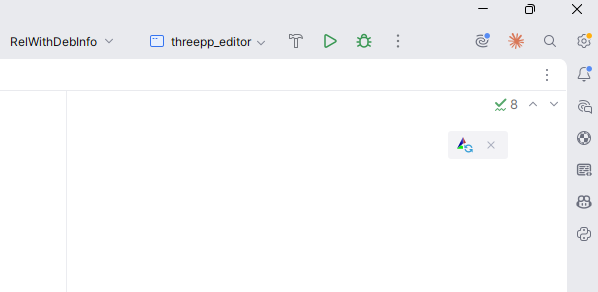
New files must be listed in a target. When you create a file with File → New → C/C++ Source File, CLion shows an Add to targets checkbox — leave it ticked and CLion writes the file into your add_executable line for you. A file that arrives any other way (copied in from the file explorer, downloaded) is not picked up automatically: add it to the list in CMakeLists.txt yourself, then reload.
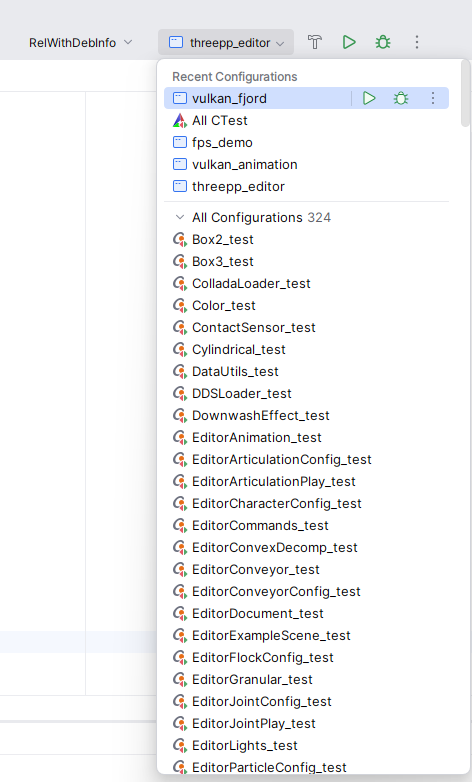
One target, one entry in the ▶ dropdown. Every add_executable in your project becomes an entry in the dropdown next to the green play button, and ▶ builds and runs the selected one. When a project has several programs — an app and its tests, say — check that dropdown before concluding your program "did not run."
Errors appear in two different places. Mistakes in CMakeLists.txt itself are configure-time errors: they appear in the CMake tool window at the bottom of CLion, at the moment the project (re)loads. Compiler and linker errors appear in the Build window when you actually build. The stage diagram above tells you who is complaining; the window it appears in tells you when it went wrong.
The build folder is disposable. Everything CMake and the compiler generate lands in cmake-build-debug/ (CLion's default name for the build/ folder). If CMake ever gets itself into a confused state — after renaming things, moving the project, or changing toolchains — use Tools → CMake → Reset Cache and Reload Project, or simply delete the cmake-build-debug/ folder. Nothing in it is yours; the next build regenerates all of it.
Setting the C++ standard
The default standard depends on the compiler, and it is rarely the one you want. Set it explicitly:
cmake_minimum_required(VERSION 3.16)
project(hello)

set(CMAKE_CXX_STANDARD 20)
set(CMAKE_CXX_STANDARD_REQUIRED ON)

add_executable(hello main.cpp)
CMAKE_CXX_STANDARD 20 tells the compiler to use C++20 (the standard this course teaches). CMAKE_CXX_STANDARD_REQUIRED ON makes it a hard requirement, without it, an older compiler would silently fall back to whatever it supports.
Turn on compiler warnings
Several pages in this book tell you to "turn warnings on." A warning is the compiler flagging code that is legal but probably a mistake — if (x = 5) instead of ==, a variable you declared and never used, a function that forgets to return. They are some of the most valuable feedback the compiler gives you, and most of them are off by default.
You switch them on with target_compile_options — but here is the catch this chapter has been hinting at: the flag names differ between compilers. GCC and Clang spell them one way, Microsoft's MSVC another:
| Compiler | Turn warnings on | Treat warnings as errors |
|---|---|---|
| GCC, Clang (incl. CLion's MinGW) | -Wall -Wextra |
-Werror |
| MSVC (Visual Studio) | /W4 |
/WX |
Hard-code -Wall -Wextra and your CMakeLists.txt breaks the moment someone builds it with MSVC — the very non-portability we want to avoid. The fix is to ask CMake which compiler it is using and choose the right flags. CMake sets the variable MSVC to true for Visual Studio, so an if() does the job:
add_executable(hello main.cpp)

if(MSVC)
    target_compile_options(hello PRIVATE /W4)
else()
    target_compile_options(hello PRIVATE -Wall -Wextra)
endif()
Now warnings turn on whether the project is built with GCC, Clang, or MSVC. They appear in CLion's build window every time you compile — read them.
Once your code builds cleanly, you can make warnings fatal, so a warning stops the build instead of scrolling past. That flag differs too (-Werror vs /WX), so it goes in the same branches:
if(MSVC)
    target_compile_options(hello PRIVATE /W4 /WX)
else()
    target_compile_options(hello PRIVATE -Wall -Wextra -Werror)
endif()
Making warnings fatal is stricter than you need on your first day, but it is a habit worth growing into: it guarantees you never ignore a warning by accident.
Treating compilers and platforms differently
The warnings block above is one case of a general need: CMake describes the build once, but the right thing to do sometimes depends on which compiler or which operating system is doing the building. Plain if() blocks and a few built-in variables cover this.
To branch on the compiler:
| Check | True when |
|---|---|
if(MSVC) |
the compiler is Microsoft's MSVC |
if(CMAKE_CXX_COMPILER_ID STREQUAL "GNU") |
the compiler is GCC |
if(CMAKE_CXX_COMPILER_ID STREQUAL "Clang") |
the compiler is Clang (Apple's build reports "AppleClang") |
To branch on the operating system:
| Check | True on |
|---|---|
if(WIN32) |
Windows (even 64-bit) |
if(APPLE) |
macOS |
if(UNIX) |
Linux and macOS |
APPLE is also UNIX, so test APPLE first when you need to tell them apart:
if(WIN32)
    target_compile_definitions(app PRIVATE PLATFORM_WINDOWS)
elseif(APPLE)
    target_compile_definitions(app PRIVATE PLATFORM_MAC)
elseif(UNIX)
    target_compile_definitions(app PRIVATE PLATFORM_LINUX)
endif()
target_compile_definitions defines a preprocessor macro — the CMake equivalent of writing #define PLATFORM_WINDOWS at the top of every file — so your C++ can select an OS-specific branch with #ifdef PLATFORM_WINDOWS.
Two rules keep this under control:
- Use it only when you must. Plain standard C++ already compiles everywhere; reach for a conditional only for the genuinely platform-specific parts — a compiler flag, a system library, an OS-only API. Most projects in this course need none beyond the warning flags above.
- Test on every platform you branch for. A
WIN32block that has never been compiled on Windows is a guess, not a feature — see Portability.
Multiple source files
A real project quickly grows beyond one file. Suppose you have:
Just list the additional .cpp files in add_executable:
Header files (.hpp / .h) are not listed, they are pulled in by #include lines in the source files. CMake only needs to know which .cpp files to compile.
For larger projects you can glob, but glob-based source lists do not pick up new files until CMake re-runs. Explicit lists are clearer:
Inside a header
What is actually in motor.hpp? Recall declarations vs. definitions from Chapter 1: the declaration tells the compiler a function exists; the definition supplies its body. A header is a file collecting declarations that several source files need to share, and #include "motor.hpp" pastes it into whichever file asks:
// motor.cpp — the definitions: how it works
#include "motor.hpp"

double motorRpm(int throttlePercent) {
    return throttlePercent * 42.0;
}
// main.cpp — any file that includes the header can call the function
#include <iostream>
#include "motor.hpp"

int main() {
    std::cout << motorRpm(50) << "\n";
}
Both motor.cpp and main.cpp are compiled (that is the add_executable list); the header is pasted into each of them. Two conventions in that little header deserve a proper introduction, because every header you ever write uses both.
#pragma once — the include guard. #include is a literal paste, and in a real project one file easily ends up including the same header twice — once directly, and once more through some other header that also includes it. The compiler would then see every declaration in it twice and reject the file with a redefinition error. #pragma once on the first line tells the compiler: "however many times this file is asked for, paste it in at most once." Put it at the top of every header you write. You will also meet the older spelling of the same idea in other people's code — Arduino libraries and older tutorials especially:
That is an include guard built from preprocessor conditionals: the first paste defines the macro MOTOR_HPP, and the #ifndef ("if not defined") makes every later paste skip straight to the #endif. It does exactly the same job as #pragma once, at the cost of three lines and a macro name you must keep unique. #pragma once is technically not part of the C++ standard, but every compiler you will meet supports it — write it in your own headers, and simply recognise the #ifndef form when you see it.
.h or .hpp? Both are header files, and the compiler treats them identically — the ending is pure convention. .h is inherited from C, so it is what C libraries (and the Arduino world) use; .hpp signals "there is C++ inside." This book uses .hpp for its own headers, so a reader can tell at a glance which headers are C++. Watch out in CLion: File → New → C/C++ Header File suggests .h by default — name the file with .hpp yourself (you can change the default under Settings → Editor → Code Style → C/C++, on the New File Extensions tab).
Headers in a separate folder
A convention that pays off as projects grow:
hello/
├── CMakeLists.txt
├── include/
│   ├── motor.hpp
│   └── sensor.hpp
└── src/
    ├── main.cpp
    ├── motor.cpp
    └── sensor.cpp
Tell CMake where the headers live so #include "motor.hpp" works from inside any source file:
add_executable(hello src/main.cpp src/motor.cpp src/sensor.cpp)
target_include_directories(hello PRIVATE include)
target_include_directories(<target> PRIVATE <path>) adds <path> to the list of folders the compiler searches for #included files when building <target>.
PRIVATE means "this is only used to build this target." For executables this is always what you want. (You will see PUBLIC and INTERFACE when you start writing libraries that other code links to.)
Building libraries
Once you have several executables that share code (your tests, your main program, perhaps a quick CLI tool), put the shared code in a library so it is compiled once:
add_library(motor src/motor.cpp src/sensor.cpp)
target_include_directories(motor PUBLIC include)

add_executable(hello src/main.cpp)
target_link_libraries(hello PRIVATE motor)
One library, compiled once, shared by every executable that links it:
%%{init: {'flowchart': {'curve': 'linear'}}}%%
graph TD
    APP["hello (executable)"] -->|links| LIB["motor (library)"]
    TESTS["tests (executable)"] -->|links| LIB
What changed:
add_librarydefines a library target. By default it is a static library — its compiled code is baked into anything that links it (more on static vs shared just below).target_link_libraries(hello PRIVATE motor)tells CMake that thehelloexecutable uses themotorlibrary. The compiler now seesmotor's headers, and the linker now combinesmotor's compiled code intohello.- The library uses
PUBLICfor its include directory, meaning anyone linking tomotoralso getsmotor'sinclude/folder on their search path. That is what you want for a library's public headers.
Static vs shared libraries
add_library builds a static library by default, and for your projects that is the right choice. The difference is when the library's compiled code joins your program:
- A static library (
.a, or.libon Windows) is copied into every executable that links it, at build time. You get one self-contained program — nothing extra to ship, and nothing that can go missing when it runs. The price is a larger executable, and you must relink to pick up a change in the library. - A shared (or dynamic) library —
.dllon Windows,.soon Linux,.dylibon macOS — stays a separate file. The executable only records that it needs it, and the system loads it when the program starts. Executables stay small, several programs can share one copy, and you can drop in a new version of the library without rebuilding them.
You pick with a keyword:
add_library(motor STATIC src/motor.cpp)   # baked into the executable (the default)
add_library(motor SHARED src/motor.cpp)   # a separate .dll / .so / .dylib
The catch with shared libraries is the one that bites beginners: the program must find that library file at run time. On Windows it has to sit next to the .exe, or in a folder on your PATH; Linux and macOS have their own library search paths. If the system cannot find it, the program refuses to start — "DLL not found" on Windows, "error while loading shared libraries" on Linux — even though it compiled and linked perfectly. A static build has nothing to locate at run time, so it never fails this way.
Prefer static for course projects: one file, nothing to lose, nothing to locate. Shared libraries earn their keep in larger systems — when many programs share one big library, or when a library must be updated on its own — and when a third-party dependency ships only as a .dll/.so, in which case you must place it where your program will find it.
CMake also has a global switch,
BUILD_SHARED_LIBS. Turn itONand everyadd_librarythat does not saySTATICorSHAREDexplicitly builds shared; leave it alone and you get static — the sensible default here.
Consuming third-party libraries
Sooner or later you will want a library someone else wrote — a testing framework, a formatting library, a maths library. The simplest way to pull one into a CMake project is FetchContent: you name a git repository and a version, and CMake downloads and builds it as part of your own build. Here is the whole pattern, fetching Catch2 (the test framework the testing chapter uses):
include(FetchContent)

FetchContent_Declare(
    Catch2
    GIT_REPOSITORY https://github.com/catchorg/Catch2.git
    GIT_TAG        v3.5.2                      # pin a version, never a moving branch
)
FetchContent_MakeAvailable(Catch2)

add_executable(tests test_motor.cpp)
target_link_libraries(tests PRIVATE Catch2::Catch2WithMain)
Four steps: include(FetchContent) loads the feature; FetchContent_Declare says where the dependency lives and which version; FetchContent_MakeAvailable downloads and builds it; then you target_link_libraries against a target the dependency exports.
What Catch2::Catch2WithMain means. That namespace::target name is a target the fetched project exports for you to link. Linking it does everything at once: the compiler gets Catch2's include paths (so #include <catch2/catch_test_macros.hpp> resolves) and the linker gets its compiled code. You never chase down header folders or .lib files by hand — the one target_link_libraries line brings the whole package along. (The :: is just a naming convention that marks it as an imported target, not your own.)
The first build is slow. The first time you configure a project with a new FetchContent dependency, CMake clones the repository and compiles it — that needs an internet connection and can take a minute or two. After that it is cached in your build/ folder and configuring is fast again.
Alternatives, named only. Two other approaches exist: find_package, which locates a library already installed on the machine (common on Linux, where the system package manager provides it), and dedicated C++ package managers such as vcpkg and Conan. They matter in larger or team projects; this course only needs FetchContent.
Two failure smells. Knowing when an error appears tells you what went wrong:
- An error at configure time (when CMake runs, before any compiling) — usually a typo in
FetchContent_Declare, a wrong repository URL or tag, or no network to download from. undefined referenceat link time (the code compiled, but the linker cannot find the library's functions) — you fetched the dependency but forgot thetarget_link_librariesline, so nothing was actually linked.
Building from the command line
CLion drives CMake for you, but every CMake project can also be built directly:
# Configure: generate build files in a 'build/' folder
cmake -B build

# Build everything
cmake --build build

# Run the executable (path varies slightly by platform)
./build/hello              # Linux / macOS
./build/hello.exe          # Windows, CLion's bundled MinGW (single-config)
./build/Debug/hello.exe    # Windows with MSVC (multi-config)
The -B build flag puts all generated files into build/ so they stay out of your source tree. Add build/ to your .gitignore — a bare build/ line matches a folder of that name at any depth, so it covers nested projects too.
Build configurations: Debug and Release
A build configuration controls how your code is compiled — chiefly whether the optimiser runs and whether debugging information is kept. Two are standard:
| Debug | Release | |
|---|---|---|
| Optimisation | none (-O0) — quick to build, easy to step through |
full (-O2/-O3) — quick to run |
| Debug info | full (-g) — the debugger sees every variable |
stripped down |
assert |
active | removed (NDEBUG is defined — see Error Handling) |
| Reach for it when | developing and debugging | measuring speed, shipping |
Choose one when you configure the project:
With a multi-config generator (Visual Studio),
-DCMAKE_BUILD_TYPEhas no effect — one build folder holds every configuration, and you pick one at build time instead:cmake --build build --config Debug. Single-config generators (Ninja, Make) use-DCMAKE_BUILD_TYPEas shown.
In CLion you do not type that — the toolbar has a configuration selector, and it keeps a separate folder per configuration (cmake-build-debug/, cmake-build-release/) so switching between them does not rebuild everything. Develop in Debug; switch to Release to measure performance or hand the program to someone else.
A program can pass in Debug and fail in Release (or the reverse). The usual culprit is an
assertthat caught the problem in Debug but is compiled out in Release, or the optimiser exposing a latent bug that happened to "work" unoptimised. That is a real bug in your code, not a compiler fault — hunt it down rather than retreating to the configuration that hid it.
CMake options: making parts of the build optional
Sometimes part of the build should be optional. The common case is the tests: someone who only wants to run your program should not be forced to download a test framework. option() declares a switch the user can flip on or off:
option(BUILD_TESTS "Build the unit tests" ON)

# the library and the program are always built
add_library(motor src/motor.cpp)
add_executable(app src/main.cpp)
target_link_libraries(app PRIVATE motor)

if(BUILD_TESTS)
    # configured only when BUILD_TESTS is ON
    add_executable(tests tests/test_motor.cpp)
    target_link_libraries(tests PRIVATE motor Catch2::Catch2WithMain)
endif()
Catch2::Catch2WithMain is not one of your own targets — it is a target from a fetched dependency, the Catch2 test framework. See Consuming third-party libraries above for how a name like that gets into your build.
option(<NAME> "<description>" <default>) creates a boolean that defaults to ON or OFF; everything inside the matching if(<NAME>) … endif() is configured only when it is on. The default holds unless someone overrides it on the command line:
This is how the testing chapter's Catch2 setup is meant to be wired: put the Catch2 FetchContent lines and the test target inside the if(BUILD_TESTS) block, so the framework is downloaded and built only when you actually want to run tests.
Prefix the name to avoid clashes. A bare
BUILD_TESTScan collide with an option of the same name if your project is ever built inside a larger one. The convention is to prefix it with your project's name —option(MOTOR_SIM_BUILD_TESTS "Build the unit tests" ON)— so it stays unambiguous.
A note on project layout
The layout below scales from one-file scripts to multi-library systems:
my_project/
├── CMakeLists.txt
├── README.md
├── .gitignore
├── include/        # public headers
├── src/            # implementation files
└── tests/          # tests (see Chapter 6)
You do not need all of these on day one. Start with one main.cpp and one CMakeLists.txt. Split into src/ and include/ when you have more than four or five files. Add tests/ when you start writing tests. The point is to grow into the structure, not to set it all up before writing any code.
For a more elaborate convention used in larger industry projects, see the Pitchfork Layout.
Splitting the build across folders
As a project grows, one big CMakeLists.txt at the top becomes hard to read. The fix is to give each folder its own CMakeLists.txt and have the top-level file pull them in with add_subdirectory:
# top-level CMakeLists.txt
cmake_minimum_required(VERSION 3.16)
project(my_project)

set(CMAKE_CXX_STANDARD 20)
set(CMAKE_CXX_STANDARD_REQUIRED ON)

add_subdirectory(src)      # the library
add_subdirectory(app)      # the application that uses it
add_subdirectory(tests)    # the tests
add_subdirectory(src) means "there is another CMakeLists.txt in src/ — go and run it." Each subfolder then defines its own targets, with the library and the application kept in separate folders:
# src/CMakeLists.txt
add_library(my_lib motor.cpp sensor.cpp)
target_include_directories(my_lib PUBLIC ${PROJECT_SOURCE_DIR}/include)
# tests/CMakeLists.txt
add_executable(tests test_motor.cpp)
target_link_libraries(tests PRIVATE my_lib)   # the library defined over in src/
Two things make this work:
- Targets are visible across folders.
my_libis created insrc/, yetapp/andtests/can link it. You do not have to define a target before the line that links it: CMake resolves target names when it generates the build at the end of configuration, so a name intarget_link_librariesfinds its target wherever it is defined. Addingsrcbefore the folders that use it is still the right habit — it keeps the file readable and matches the order things are built — but it is convention, not a requirement. ${PROJECT_SOURCE_DIR}is the folder of the nearestproject()call, so${PROJECT_SOURCE_DIR}/includefinds the shared headers from any subfolder. (Prefer it over${CMAKE_SOURCE_DIR}, which points at the outermost project and breaks if this project is ever pulled into a larger one withadd_subdirectory.)
The pay-off: each folder's build sits next to its code, and the top-level file becomes a short table of contents. The Tank Control System worked example uses exactly this layout once it grows a test suite.
When the build breaks
Five failures account for almost every CMake problem students bring to the lab. Match the symptom, apply the fix.
Cannot find source file: motor.cpp — a configure-time error (CMake tool window, before anything compiles). CMakeLists.txt names a file that is not where it says: a typo in the name, or the file lives in a subfolder (src/motor.cpp) while the list says motor.cpp. Paths in add_executable are relative to the CMakeLists.txt that contains them — fix the path, reload.
undefined reference to 'motorRpm()' — a link-time error (Build window, after everything compiled). The linker never received the compiled body of that function. Almost always: you wrote motor.cpp but forgot to list it in add_executable, or you forgot the target_link_libraries line for the library that contains it. Add it, reload, rebuild. Note the misdirection: the error is reported on the file that calls the function, which is not the file you need to fix.
multiple definition of 'main' — also at link time. Two source files in the same target each define main; the linker cannot pick one. Two programs mean two targets: give each file its own add_executable, exactly like exercise 1.
"I changed the code, but the program behaves like before." Two usual causes, both in CLion: the ▶ dropdown is set to a different target than the one you edited, or you changed CMakeLists.txt and never reloaded, so the build still follows the old description.
"It builds and runs, but cannot find my file." The program opens data.txt, gets nothing — because it runs inside cmake-build-debug/, and relative paths are resolved from there, not from your source folder. That is a working-directory problem, not a CMake one: see or change it under Run → Edit Configurations → Working directory.
And when the symptom matches nothing at all — the project was fine yesterday, nothing you changed explains it — reset: Tools → CMake → Reset Cache and Reload Project, or delete cmake-build-debug/ and let it regenerate. A stale cache after renames or toolchain changes produces exactly this kind of inexplicable breakage, and the reset is free.
Summary
CMakeLists.txtdescribes your project; CMake turns the description into platform-specific build files.- Three lines suffice for a single-file program:
cmake_minimum_required,project,add_executable. - Set
CMAKE_CXX_STANDARD 20explicitly. - Put compiler- or OS-specific settings (such as warning flags) behind
if(MSVC)/if(WIN32)/if(APPLE)/if(UNIX)blocks — and keep them to the genuinely platform-specific bits. - Add more source files by listing them in
add_executable. Headers do not need to be listed. - Use
target_include_directorieswhen headers live in a separate folder. - Use
add_libraryandtarget_link_librariesonce you have code shared between executables. - Pull in a third-party library with
FetchContent(FetchContent_Declare+FetchContent_MakeAvailable), then link the target it exports (ns::target). - Split a large build across folders by giving each its own
CMakeLists.txtand wiring them together withadd_subdirectory. - Libraries are static by default — baked into the executable, nothing to ship; prefer that, and reach for a shared library (
.dll/.so) only when you need it (and then the program must find it at run time). - In CLion: edits to
CMakeLists.txttake effect only after a reload; every new file must be listed in a target; the ▶ dropdown decides which target runs. - Keep build artefacts in a separate
build/folder; ignore it in git. The folder is disposable — deleting it (or Reset Cache and Reload Project) cures a confused CMake. - Pick a build configuration with
-DCMAKE_BUILD_TYPE(or CLion's selector): Debug to develop and debug, Release to measure and ship. - Make parts of the build optional with
option(NAME "…" ON)and anif(NAME)block — e.g. gate the tests behindBUILD_TESTS.